I struggled to find advice on this anywhere, and as you can imagine, if you are looking for this, it's incredibly useful. I happened to stumble across this tutorial unintentionally after hours of unfruitful searching.
Rather than rehashing what is covered in this very well explained tutorial, I thought I'd just share it here.
Thanks a tonne ChunYou Sim for creating this excellent tutorial. It's a great starting place for Python in Houdini, and I was able to start using the information I learned in this video immediately.
George Hulm
3D Artist
Python in Houdini 2 : Dynamic Creation of HDA parameters using Python (ChunYou Sim)
Tutorial / 07 August 2021
Python in Houdini 1 : Batch Exports with "For Loops"
Tutorial / 23 April 2020
This series of blog posts is intended just as much to help others as it is to serve as a personal bank of things that I've learned during my stint as someone learning to use Houdini. It's less about "why", and more about "how".
I'm primarily a games artist, or a "realtime" artist. So these little workflows and tricks are things that I've found useful, or spent a while trying to figure out myself. I'm still working on a blog about the tree tool i'm creating in Houdini, but those are longer format, whereas these are just meant to be little tips.
So without further ado:
Batch Exports with "For Loops"
Often when working on environments, you want to export a bunch of connected/similar pieces as Separate meshes. Sometimes you need to do this dozens or even hundreds of times, and sometimes the Houdini to Unreal link just wont cut it.
Manually exporting these files 1 by 1, over and over again every time you make a small change, is a wast of time and money. Here is a general purpose solution which doesn't require too much digging, and works for a variety of different cases.
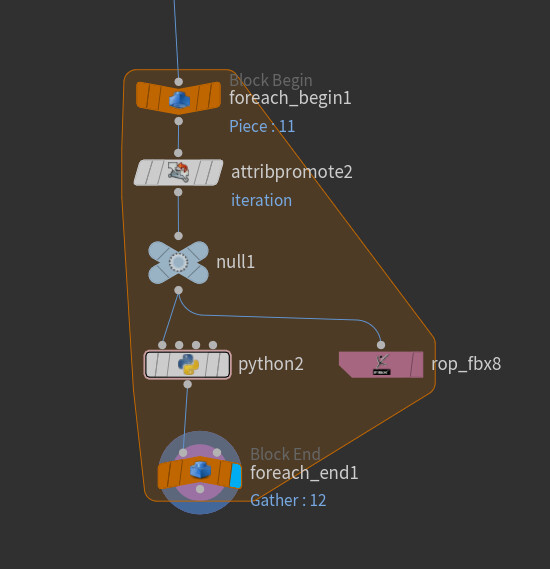
This very simple piece of logic which loops through primitives, or through geometry which share an attribute, and then:
1. Promotes the "iteration" attribute to string attribute and stores it as a detail attribute.
2. in the rop_fbx node; appends the string "iteration" attribute to the name of the output file:

3. And finally, runs this line of python, which simply executes the "save to disk" function of the rop_fbx node.
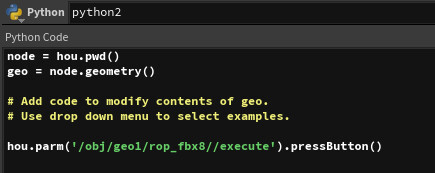
Now when you execute the for loop, it will automatically export each file with a unique file name.

You can take this approach and make it as complex as you like. For example, using it to output Terrain tiles, with automatically generated lods, weightmaps and textures per tile all inside the for loop. This can be an optimization when dealing with extremely large terrains, and I've found it exports a tiled terrain many orders of magnitude faster than the stock "HF_OUTPUT" tiled output mode.
It may be possible to take this approach and make it even faster using "compiled blocks", or perhaps exploring another avenue entirely, such as PDG. But that's for another time.